茴字的 N 种写法:正则文本提取 sed vs awk vs grep \K

style-notepad len:1896 crease:61% color:1 rot:-2

任务: 从如下名为 info.txt 的多行文本中提取出 "1.2.3-beta"

Project: SuperApp
Current version is v1.2.3-beta
Build date: 2021-07-03

1. sed

sed -nE 's/.*version is v(.*)/\1/p' info.txt
  • 优点: 随处可见,标准的 POSIX 工具。
  • 缺点: 语法可读性较差;需要捕获整行并将其替换。我们还必须加上 -np 来防止打印出不匹配的行。

2. awk

awk '/version is v/ {print $4}' info.txt | sed 's/^v//'
  • 优点: 对于结构化强、以空格分隔的文本非常简单。
  • 缺点: 非常脆弱。如果空格数量有变立马失效;而且依然需要通过管道传给后面的命令来去掉前缀 v

3. grep -o

grep -o 'version is v[0-9].*' info.txt | awk '{print $3}' | cut -c 2-
  • 优点: grep -o 是提取正则匹配内容的标准工具。
  • 缺点: 因为它连带捕获了作为锚点的前缀(version is v),所以你不得不把结果通过管道传给 awkcut,只为了把不需要的字符清理掉。

4. grep -Po \K

grep -Po 'version is v\K.*' info.txt
  • 优点: 一条命令实现完美的精准提取。\K 会匹配前缀内容,但在最终输出时自动将其丢弃。
  • 缺点: 依赖 PCRE (-P),这意味着在 macOS 上无法开箱即用(macOS 自带的 BSD grep 完全不支持 -P 参数)。
    • macOS 解决方案 1: brew install grep(使用 ggrep -Po 运行)。
    • macOS 解决方案 2: 直接使用 Perl:perl -nle 'print $& if m/version is v\K.*/' info.txt

5. 标准后行断言 Lookbehinds (?<=...)

grep -Po '(?<=version is v).*' info.txt
  • 优点: 标准的正则表达式概念。
  • 缺点: 标准的后行断言必须是固定长度的。你不能在里面使用 *+ 这种不定长的通配符(比如 (?<=version:\s*) 就会报错)。而 \K 则完美支持不定长的匹配,实用性远胜于此。

茴字的 N 种写法:正则文本提取 sed vs awk vs grep \K

style-notepad len:1896 crease:61% color:1 rot:-2
Jul 3, 2021

任务: 从如下名为 info.txt 的多行文本中提取出 "1.2.3-beta"

Project: SuperApp
Current version is v1.2.3-beta
Build date: 2021-07-03

1. sed

sed -nE 's/.*version is v(.*)/\1/p' info.txt
  • 优点: 随处可见,标准的 POSIX 工具。
  • 缺点: 语法可读性较差;需要捕获整行并将其替换。我们还必须加上 -np 来防止打印出不匹配的行。

2. awk

awk '/version is v/ {print $4}' info.txt | sed 's/^v//'
  • 优点: 对于结构化强、以空格分隔的文本非常简单。
  • 缺点: 非常脆弱。如果空格数量有变立马失效;而且依然需要通过管道传给后面的命令来去掉前缀 v

3. grep -o

grep -o 'version is v[0-9].*' info.txt | awk '{print $3}' | cut -c 2-
  • 优点: grep -o 是提取正则匹配内容的标准工具。
  • 缺点: 因为它连带捕获了作为锚点的前缀(version is v),所以你不得不把结果通过管道传给 awkcut,只为了把不需要的字符清理掉。

4. grep -Po \K

grep -Po 'version is v\K.*' info.txt
  • 优点: 一条命令实现完美的精准提取。\K 会匹配前缀内容,但在最终输出时自动将其丢弃。
  • 缺点: 依赖 PCRE (-P),这意味着在 macOS 上无法开箱即用(macOS 自带的 BSD grep 完全不支持 -P 参数)。
    • macOS 解决方案 1: brew install grep(使用 ggrep -Po 运行)。
    • macOS 解决方案 2: 直接使用 Perl:perl -nle 'print $& if m/version is v\K.*/' info.txt

5. 标准后行断言 Lookbehinds (?<=...)

grep -Po '(?<=version is v).*' info.txt
  • 优点: 标准的正则表达式概念。
  • 缺点: 标准的后行断言必须是固定长度的。你不能在里面使用 *+ 这种不定长的通配符(比如 (?<=version:\s*) 就会报错)。而 \K 则完美支持不定长的匹配,实用性远胜于此。

A ksh bug on "wait"

style-notepad len:984 crease:26% color:2 rot:2

WTF?

$ cat kshbug
{ return 0; } &
evil=$(/bin/true)   # XXX: works fine without this line
wait $!
echo $?

$ ksh kshbug
127

$ ksh --version
version         sh (AT&T Labs Research) 1993-12-28 r

The correct return code should be 0. Without the line of “eval=$(bin/true)” everything works fine. The problem happens only when

  1. Execute a function or a clause in background, and
  2. A subshell is invoked between the background execution and the “wait”, and
  3. An external command is executed in the subshell

I googled for a while, there’s no ksh bug report so far, workaround could be use output text for return code check instead. Note there’s a similar report for ksh on solaris but it’s not the identical issue.

Pdksh (public domain ksh) doesn’t have the problem. (See another bug ).

Couldn’t figure out where to report this bug so gave up.

Update: this issue doesn’t happen on Ubuntu ksh version sh (AT&T Research) 93s+ 2008-01-31.

A ksh bug on "wait"

style-notepad len:984 crease:26% color:2 rot:2
Nov 9, 2009

WTF?

$ cat kshbug
{ return 0; } &
evil=$(/bin/true)   # XXX: works fine without this line
wait $!
echo $?

$ ksh kshbug
127

$ ksh --version
version         sh (AT&T Labs Research) 1993-12-28 r

The correct return code should be 0. Without the line of “eval=$(bin/true)” everything works fine. The problem happens only when

  1. Execute a function or a clause in background, and
  2. A subshell is invoked between the background execution and the “wait”, and
  3. An external command is executed in the subshell

I googled for a while, there’s no ksh bug report so far, workaround could be use output text for return code check instead. Note there’s a similar report for ksh on solaris but it’s not the identical issue.

Pdksh (public domain ksh) doesn’t have the problem. (See another bug ).

Couldn’t figure out where to report this bug so gave up.

Update: this issue doesn’t happen on Ubuntu ksh version sh (AT&T Research) 93s+ 2008-01-31.

TETware Infinite Loop: The ksh93 Bug That Filled My Hard Drive

style-newspaper len:2120 crease:28% color:2 rot:3

While using TETware as our automated testing framework, I’ve increasingly found it to be incredibly frustrating. The ksh API portion, in particular, feels severely outdated. Despite making numerous local modifications, it remained clunky. Today, however, I uncovered an infinite loop hiding within one of its core logging interfaces. After diving deep into the issue, it turned out to be a native bug in ksh93. If this interface hadn’t been written so poorly in the first place, this shell bug might have remained hidden forever.

Here is the breakdown of the bug.

In ksh, the ${parameter%pattern} syntax is used to strip a suffix from a string, while ${parameter#pattern} strips a prefix. These are commonly used to extract directories and filenames from paths. However, when the parameter is a multi-line string and the pattern matches the \n.*(.*).* regex format, the shell parser completely fails:

$ cat ksh93bug
NL=$'\n'

PAT="$1"

A="Hello $NL$PAT"
echo "${A%$NL$PAT}"

A="$PAT$NL world"
echo "${A#$PAT$NL}"

$ ksh ksh93bug '()'
Hello
()
()
 world

$ ksh ksh93bug 'a(b)c'
Hello
a(b)c
a(b)c
 world

This bug is strictly isolated to AT&T’s ksh93, including the latest versions. Both bash and the public domain ksh (pdksh) handle it flawlessly:

$ bash ksh93bug '()'
Hello
 world

$ bash ksh93bug 'a(b)c'
Hello
 world

In our specific scenario, the code executed out=$(mount) followed by tet_infoline "$out". This immediately caused a freeze. TETware’s tetapi.ksh script relies on %% within a loop inside the tet_output function to process multi-line text. Because the suffix was never actually deleted due to the bug, the loop never terminated. When I attempted to debug the freeze by enabling set -x, the infinite loop generated logs so rapidly that it filled my entire hard drive to 100% capacity in seconds! :P

I initially intended to report this upstream, but after struggling to find a proper bug tracker on the ksh93 homepage , I gave up. For now, I’ve just patched our instance of TETware directly.

TETware Infinite Loop: The ksh93 Bug That Filled My Hard Drive

style-newspaper len:2120 crease:28% color:2 rot:3
Mar 15, 2009

While using TETware as our automated testing framework, I’ve increasingly found it to be incredibly frustrating. The ksh API portion, in particular, feels severely outdated. Despite making numerous local modifications, it remained clunky. Today, however, I uncovered an infinite loop hiding within one of its core logging interfaces. After diving deep into the issue, it turned out to be a native bug in ksh93. If this interface hadn’t been written so poorly in the first place, this shell bug might have remained hidden forever.

Here is the breakdown of the bug.

In ksh, the ${parameter%pattern} syntax is used to strip a suffix from a string, while ${parameter#pattern} strips a prefix. These are commonly used to extract directories and filenames from paths. However, when the parameter is a multi-line string and the pattern matches the \n.*(.*).* regex format, the shell parser completely fails:

$ cat ksh93bug
NL=$'\n'

PAT="$1"

A="Hello $NL$PAT"
echo "${A%$NL$PAT}"

A="$PAT$NL world"
echo "${A#$PAT$NL}"

$ ksh ksh93bug '()'
Hello
()
()
 world

$ ksh ksh93bug 'a(b)c'
Hello
a(b)c
a(b)c
 world

This bug is strictly isolated to AT&T’s ksh93, including the latest versions. Both bash and the public domain ksh (pdksh) handle it flawlessly:

$ bash ksh93bug '()'
Hello
 world

$ bash ksh93bug 'a(b)c'
Hello
 world

In our specific scenario, the code executed out=$(mount) followed by tet_infoline "$out". This immediately caused a freeze. TETware’s tetapi.ksh script relies on %% within a loop inside the tet_output function to process multi-line text. Because the suffix was never actually deleted due to the bug, the loop never terminated. When I attempted to debug the freeze by enabling set -x, the infinite loop generated logs so rapidly that it filled my entire hard drive to 100% capacity in seconds! :P

I initially intended to report this upstream, but after struggling to find a proper bug tracker on the ksh93 homepage , I gave up. For now, I’ve just patched our instance of TETware directly.

请让 Bash PS1 有用

style-notepad len:1655 crease:43% color:0 rot:-2

有些“高级”工程师、资深 Unix 用户,他们使用 bash 的时候就是一个默认的类似 bash-3.2 $ 的提示符,然后干活的过程中不停的 pwd,pwd,现在我涵养好一些了,不会在旁边看着想楱他两拳了。还有人不用 $ 做提示符,偏用 >,好像他就是个黑客,然后干活的时候敲 whoami(还不是更短的 id)看自己到底是 root 还是普通用户。没错,PS1 是个很个性的东西,但是总得要让自己干活更有效率一点吧?

提示符,起不到提示作用还叫什么提示符?

我的提示符需求:

  • 提示符应该能在一大堆命令输出中容易辨认。用粗体文字显示提示符比用带颜色的好,恰到好处,不喧宾夺主。
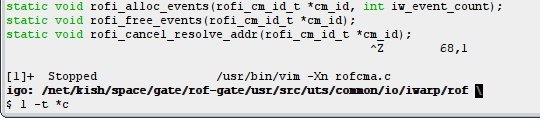
  • 应当提示有后台进程。经常在 vim 的时候 ^Z 临时敲命令,完了再 fg 回去。但是经常忘记文件已经在编辑,会再次 vim 打开它,造成一些麻烦。用反显的颜色提示有后台进程不错。 bash 的 PS1 有个 \j 可以输出后台进程的个数,但是我讨厌它输出 0。
  • 经常要复制当前路径、写命令过程,因此提示当前全路径是必须的,另外在这个变态 NFS 网络里面,经常会有很长的路径,$ 提示符有可能跑到屏幕最右边去,命令只好折行了,费眼神。于是让上一行末尾是个表示续行的反斜线,让 $ 和命令始终在新行开始,复制命令过程给别人也方便。

我的配置是这样的:

function job_color {
    [[ -n $(jobs) ]] && echo -e "\e[7m"
}

export PS1='\e[1m\h: \w $(job_color)\e[0m\n\$ '
PS1

请 man bash,看 PROMPTING 一节。

请让 Bash PS1 有用

style-notepad len:1655 crease:43% color:0 rot:-2
Nov 16, 2007

有些“高级”工程师、资深 Unix 用户,他们使用 bash 的时候就是一个默认的类似 bash-3.2 $ 的提示符,然后干活的过程中不停的 pwd,pwd,现在我涵养好一些了,不会在旁边看着想楱他两拳了。还有人不用 $ 做提示符,偏用 >,好像他就是个黑客,然后干活的时候敲 whoami(还不是更短的 id)看自己到底是 root 还是普通用户。没错,PS1 是个很个性的东西,但是总得要让自己干活更有效率一点吧?

提示符,起不到提示作用还叫什么提示符?

我的提示符需求:

  • 提示符应该能在一大堆命令输出中容易辨认。用粗体文字显示提示符比用带颜色的好,恰到好处,不喧宾夺主。
  • 应当提示有后台进程。经常在 vim 的时候 ^Z 临时敲命令,完了再 fg 回去。但是经常忘记文件已经在编辑,会再次 vim 打开它,造成一些麻烦。用反显的颜色提示有后台进程不错。 bash 的 PS1 有个 \j 可以输出后台进程的个数,但是我讨厌它输出 0。
  • 经常要复制当前路径、写命令过程,因此提示当前全路径是必须的,另外在这个变态 NFS 网络里面,经常会有很长的路径,$ 提示符有可能跑到屏幕最右边去,命令只好折行了,费眼神。于是让上一行末尾是个表示续行的反斜线,让 $ 和命令始终在新行开始,复制命令过程给别人也方便。

我的配置是这样的:

function job_color {
    [[ -n $(jobs) ]] && echo -e "\e[7m"
}

export PS1='\e[1m\h: \w $(job_color)\e[0m\n\$ '

PS1

请 man bash,看 PROMPTING 一节。